
We have added a new system attribute, FSM Category in order to hold that data to be used for analysis.
To send this data to GO 4 Schools, you will need to:
- Assign the role Bursar on the SIMS account that generates the general feed for GO 4 Schools
- Update the report that is used in the general feed
The GO 4 Schools Feed System is usually installed on the school's SIMS server (other locations to check are servers specifically for "apps" but they will always have a local SIMS client installed as well as the feed system).
To find the SIMS account that requires the additional role Bursar, on the SIMS server:
- Locate the program "Feed system", run it as admin
- The account will be under MIS Settings tab
Once the role Bursar has been granted in SIMS, proceed to update the "students2" report. This new report definition (RptDef) is attached below this article, for you to save on the server that has the Feed system, overwriting the existing file when prompted:
C:\Program Files (x86)\Hyperspheric Solutions Ltd\GO 4 Schools Feed System\BatchFiles\SIMS\Report Definitions\GO 4 Schools - students2.RptDef
Note: Above is the default location, if you chose to install the tool elsewhere and cannot find it, search for "Feed system" on Windows taskbar, right-click on the application > Open File Location, this will open that shortcut's location > Right-click on shortcut, Open File Location again, which will open your installation location.
Next, you will need to delete the report in SIMS > Reports > Design report > Open an existing report > expand "Focus" > Students > select GO 4 Schools - students2 then tap DEL on keyboard to delete it (delete every copy).
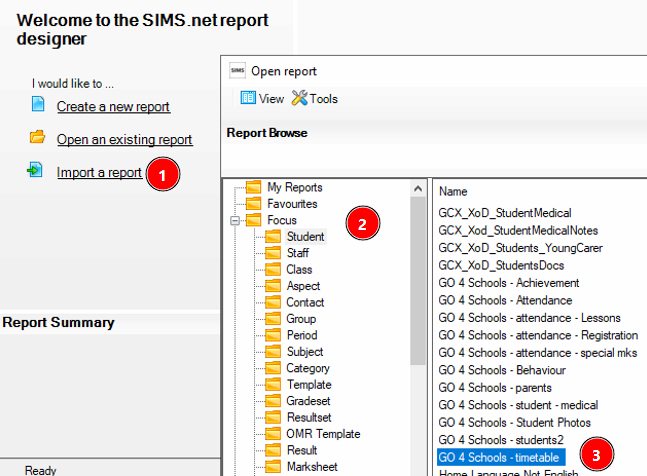
Once that is done, in the Report Designer > Import a report > Open > select the GO 4 Schools - students2.RptDef file saved earlier in Report Definitions > Import.
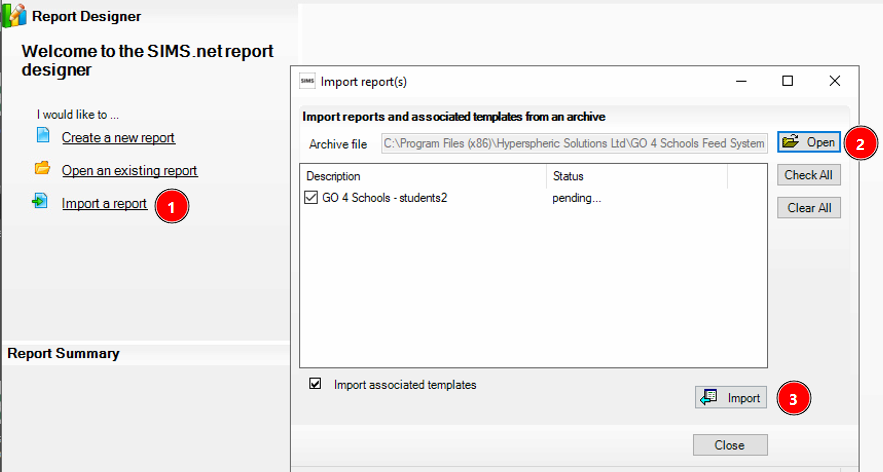
Confirm that the report has imported:

Once complete, the FSM Category attribute will be included in the next successful overnight feed to GO 4 Schools. No further action is required.
If you've noticed that the data for FSM Category has not imported overnight, please first check that the role Bursar has been assigned to the correct SIMS account, as that's a requirement to export this data.